
- TinyGraphs
- SparkCode Professional
- Duplicate Remover
- ConnectCode Deluxe Add-In
- ConnectCode Barcode Font Pack
- ConnectCode Number Manager
- ConnectCode Text Manager
- TraderCode Technical Indicators
- Neural Networks Trading
- Financial Modeling - Free Investment and Financial Calculator
NeuralCode - Neural Networks Trading
NeuralCode is an industrial grade Artificial Neural Networks implementation for financial prediction. The software is designed to utilize Supervised Learning with Multi-Layer Perceptrons and Optimized Back Propagation for complex learning. Or in simple words, the software can take historical data like the Opening price, High, Low, Volume and other technical indicators for predicting or uncovering trends and patterns.
Download - Purchase - What is Neural Networks? - Demo Videos
Price $129.90 (Single User License)
User feedbacks
Seamless interface with the familiar MS Excel infrastructure. Not appallingly overpriced like some self-decribed "leaders" in this particular software niche.Program is very fast and easy to use. I like it!
So far so good. interface is manageable, installation was easy. Great app covering a interesting topic.
What I like about NeuralCode is that it can integrate with excel which I am already familiar with for stock forecasting.
Build for Excel
The software is implemented entirely without external object libraries and thus will not require data to be passed out for processing. This results in extremely efficient and optimized processing.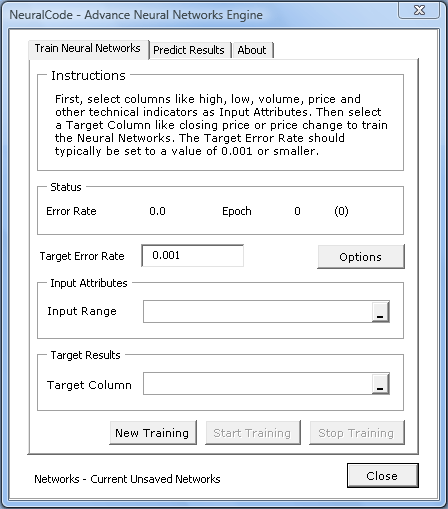
Screenshot in Excel
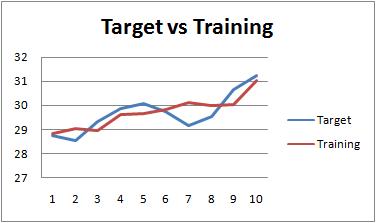
Screenshot of Neural Network Training in Progress
What is required for using NeuralCode in Trading?
No prior knowledge of Neural Networks is required. We have provided examples in the application to get you started. Simply use data like Open, High Low, Close or other technical indicators to train the network, after which you can use it to predict prices or buy/sell signals.How do I start?
You will require Microsoft Excel 2002/2003/XP/2007/2010 to use NeuralCode. After installing NeuralCode, the installer will automatically setup your Excel to allow you to make use of the software.You can also launch the “NeuralCode.xls” spreadsheet. It contains step by step instructions to train the neural networks and use it for prediction.
Samples
- Training NeuralCode with simple Mathematical Logical Operators
- Training NeuralCode with Stock information for prediction
- Training NeuralCode with Stock information with Charts displaying the progress
What is Neural Networks?
Neural Networks are made up of interconnecting nodes (neurons) for solving complex problems without the need to creating a real life mode system. The diagram below shows a simple Neural Network.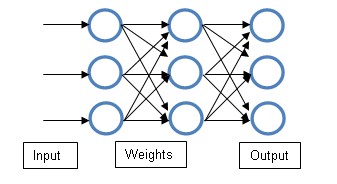
Basically, with the network arrange above, it will be able to automatically infer certain relationships if you provide it with training data and the associated targeted output.
The goal of NeuralCode is for you to pass in the financial data (Dates, Opening price, High, Low, Volume and other technical indicators’ values) and relates them to a quantity you will like to predict (e.g. Closing Price).
The mechanism that the neural networks learn is by error reduction. This means the inputs are feed into a network with adjustable weights. When the output is produced, it is compared with the targeted output. The aim is to modify the weights automatically such that the output produced becomes the target. The process of feeding the data and providing the target output in scientific terms is called supervised learning. In a way we are teaching the networks what the correct output should be. Perceptrons refer to the layer of network nodes with adjustable weights. It has been proven in mathematical theory, that under suitable conditions, the iterative procedure of adjusting the weights causes the networks to converge to a set of correct weights that can be useful for predicting complex (non linearly separable problems) trends and patterns.
During the learning process, the Neural Networks have a means of attributing errors to the different nodes and in turn determine which weights should be adjusted more. This mechanism is called Back Propagation.
After the training process (supervised learning), the network is then used to predict unknown or new inputs. Basically, the network is supposed to have learnt the basic underlying trends or patterns of the input and be able to predict or give a guidance of the outputs.
Download NeuralCode 1.3
Download a free trial of the NeuralCode Add-In for Excel
System Requirements
- Windows XP, Vista, 7, 8 or 10
- Windows Server 2003, 2008, 2012 or 2016
- 512 MB RAM
- 5 MB of Hard Disk space
- Excel 2003, Excel 2007, Excel 2010, Excel 2013 or Excel 2016
NeuralCode.exe (EXE Format - 548 KB)
NeuralCode.zip (Zip Format - 538 KB)