
Net Present Value - NPV
Now that we have defined what Present Value and Future Value is, we have a standard and consistent manner which we can compare the different investments. An investment typically involves putting in an initial amount (cash outflow) and subsequently reaping the rewards in following years (cash inflow). For the investment to make sense, the Cash Inflow will need to be greater than the Outflow.The rewards in subsequent years need to be discounted with interest. As it is possible to simply put the initial investment amount in the Banks or US Treasury Bills which are relatively risk free to earn interest.
With this as the basis, Net Present Value (NPV) is defined as the present value of all cash inflows minus the present value of all cash outflows. If NPV is positive, the investment is making money. If you have two investments, both with positive NPV, you should consider the one with the higher NPV as it is making more money.
NPV = Present Value of all cash inflow - Present Value of all cash outflow
or
NPV = Sum of Net Cash Flow discounted with interest from t=0..n
= Sum(CFt/((1+r)^t)) where t is 0..n
CFt is the Cash inflow minus the cash outflow at time t
- NPV is Net Present Value
- n is the whole investment period
- t is the specific investment period
- r is the interest rate
The Net Present Value.xls spreadsheet illustrates how the Net Present Value can be calculated easily. Simply key in the Discount Rate, Cash Outflow (column B) and Cash Inflow (column C) to get the NPV.
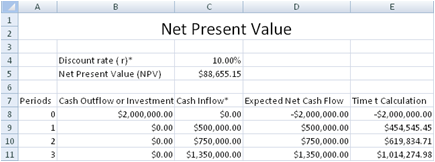
A spreadsheet model to calculate the Net Present Value of multiple projects is also provided in the same file. This is shown below.

Next :
Internal Rate of Return (IRR)
Back to Free Investment and Financial Calculator main page.
Back to Excel Add-Ins and Templates main page.