
- TinyGraphs
- SparkCode Professional
- Duplicate Remover
- ConnectCode Deluxe Add-In
- ConnectCode Barcode Font Pack
- ConnectCode Number Manager
- ConnectCode Text Manager
- TraderCode Technical Indicators
- Neural Networks Trading
- Financial Modeling - Free Investment and Financial Calculator
ConnectCode Text Manager
Add-in for Microsoft® Excel®
ConnectCode Text Manager is a productivity Add-in for working with text in Microsoft® Excel®. It allows you to easily make modifications to the text of existing cells, range or entire worksheet. Changing the text from a range of cells to a different case, removing specific special characters (or multiple characters) and trimming the cells can all be carried out very effectively and easily. This Add-in also allows you to concatenate several cells together and add spaces for the text of the cells. This is a must have Add-in if your daily tasks involve working with text in Excel. It will definitely save you many hours of tedious work.
Price $29.90 (Single User License)
Features
Apply To

- Range - Click on Range and then do a select of cells in Excel using the mouse. All the selected cells will apply the Text Operations described below when you click the Apply button. The unregistered version comes with a maximum 10 cells restriction.
- Entire active sheet - Select this option to apply the Text Operations on the entire worksheet.
Change Case
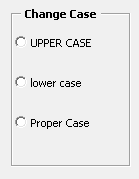
- UPPER CASE - Change all the text in the selected cells to upper case.
- lower case - - Change all the text in the selected cells to lower case.
- Proper Case - - Change all the text in the selected cells to proper case. This means the first character of every word will be in upper case while the rest of the characters of the same word will be in lower case.
Remove Characters or Text

This option allows you to quickly and easily remove unwanted characters or text from your specified range.
- Choose Character(s) - Select one or more characters from this box and click "Apply" to remove the unwanted characters.
- Specify Character or Text - If you select this option, a dialog will pop up when you click on the Apply button. You may specify the characters you want to remove within the dialog.
- Match Case - Match the case in the cell exactly before removing the characters.
- Whole Cells - Remove the specified text or characters if they occupy the entire cell.
Trimming
- Left Trim - Remove all the leading spaces. For example, " The quick fox. " becomes "The quick fox. ".
- Right Trim - Remove all the trailing spaces. For example, " The quick fox. " becomes " The quick fox.".
- Left & Right Trim - Remove all the leading & trailing spaces. For example, " The quick fox. " becomes "The quick fox.".
- All Trim - Remove all the leading, trailing & excess spaces. For example, " The quick fox. " becomes "The quick fox.".
Concatenate (Join) Text
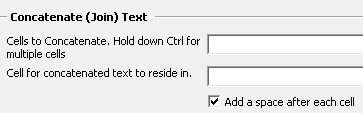
This option allows you to quickly and easily concatenate text from different cells and add a space between the text. The unregistered version comes with a maximum 2 cells restriction.
Download
Download a free trial of the ConnectCode Text Manager Add-In
System Requirements
- Microsoft® Windows 7, 8 or 10
- 300 MHz processor
- 64 MB RAM
- 5 MB of Hard Disk space
- Excel 2007, 2010, 2013 or 2016
TextManager.exe (EXE Format)
TextManager.zip (Zip Format)